Suno AI prompts: the complete 2026 guide to writing prompts that actually work (v5 and v5.5)
Most Suno guides hand you a pile of genre words and wish you luck. Then your song comes out muddy, the chorus lands in the wrong place, and you have burned four credits learning nothing.
Stop wasting your Suno credits on unpredictable outputs and start generating exactly what you want on the first try. I just launched the Ultimate Suno AI Prompt Pack, featuring a mastery guide and 1,000 battle-tested prompts structured in a developer-ready JSON database. Grab it today to plug these proven formulas directly into your AI music workflow.
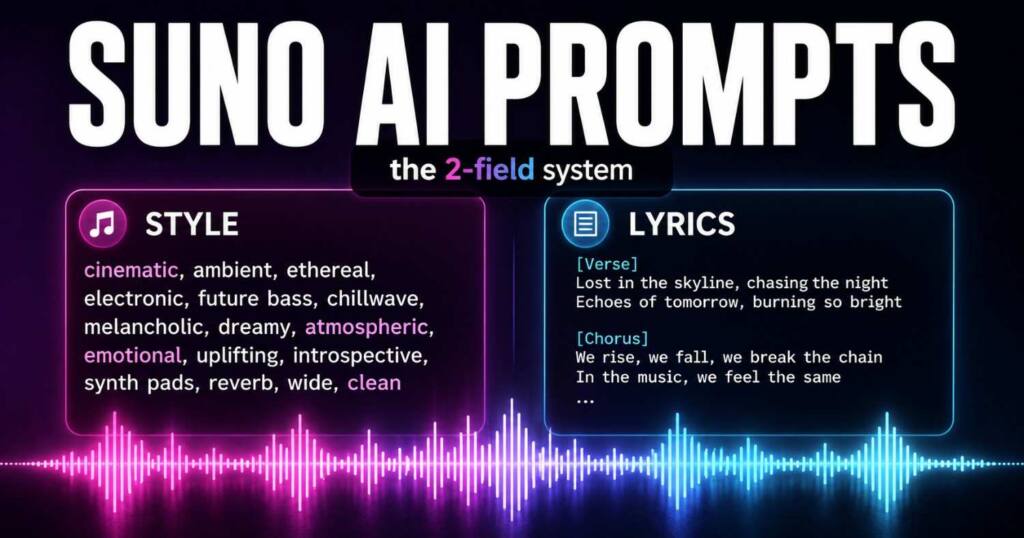
The fix is not a longer prompt. It is understanding that Suno reads two separate boxes in two completely different ways, and almost every beginner pours the wrong words into the wrong one. Get that split right and your hit rate jumps before you touch a single fancy tag.
This guide is current for Suno v5 and the v5.5 update that arrived in March 2026. Copy-paste formulas are included near the end.
The mistake every beginner makes: treating the two boxes as one
Suno’s Advanced (Custom) mode gives you two fields, and they are not interchangeable. The Style field controls how the song sounds. The Lyrics field controls what gets sung and where the sections fall.
Pour a verse into the Style box and Suno may try to sing your description. Stuff genre words into the Lyrics box and they can leak into the vocal. Keep them apart and the model stops fighting you.
Here is the clean division of labor:
- Style field: genre, sub-genre, mood, tempo, instrumentation, vocal type, production feel.
- Lyrics field: the actual words, plus square-bracket structure tags like [Verse] and [Chorus] that mark sections.
Learn that one boundary and most of the internet’s “Suno sounds random” complaints disappear.
Writing the Style field: a formula that holds up
Vague style prompts get vague songs. “Happy pop song” gives Suno almost nothing to lock onto, so it picks for you.
A reliable Style formula stacks five things in plain language: genre, mood, vocal type, key instruments, and production feel. You do not need perfect grammar, just clear signal.
Compare the three levels:
- Weak: pop song
- Better: upbeat dance-pop, female vocals, catchy chorus
- Strong: bright dance-pop, 118 BPM, female vocals, glossy synth hook, punchy drums, summer road-trip energy
The strong version names tempo, vocal gender, a lead sound, and an emotional scene. That last part matters more than people expect, which brings us to the trick that separates good prompts from great ones.
Use scene language, not just sound words
Sound words describe the genre. Scene words describe the moment, and Suno translates mood better when you give it a picture.
Instead of stacking ten adjectives, anchor the feeling: “late-night empty highway,” “1983 neon arcade,” “rainy rooftop at 2am.” One vivid scene does more work than a paragraph of synonyms.
You can combine both. “Dark synthwave, male vocals, analog bass, driving through a deserted city at midnight” gives Suno a genre and a world to score.
Tag economy: the part nobody explains
Here is the insight that fixes more songs than any prompt list. Tags are powerful, but they obey a budget, and overloading them makes Suno worse, not better.
Two rules carry most of the weight. First, placement: your most important style words land hardest in the first 20 to 30 words of the Style field and at each section change in the lyrics. Second, restraint: cap yourself near 1 to 2 genre tags, 2 to 3 instruments, and 1 to 2 mood tags.
Push past 3 or 4 instruments and the model starts smearing them together. More tags feel like more control. In practice they dilute the signal and you get mush.
Structure tags: directing the song section by section
Inside the Lyrics field, square-bracket tags tell Suno where sections begin. They are the difference between a rambling clip and a song with a real arc.
The core set works across every recent version:
| Tag | What it does |
|---|---|
| [Intro] | Opens the track, often instrumental |
| [Verse] / [Verse 1] | Standard verse section |
| [Pre-Chorus] | Builds tension into the hook |
| [Chorus] | The main hook, your biggest moment |
| [Bridge] | Contrast section, usually after verse 2 |
| [Outro] | Closes the track |
Place these on their own line, directly above the lyrics for that section. A labeled chorus that repeats word for word teaches Suno to treat it as the hook and bring it back with the same energy.
Vocal and dynamic tags: where v5 pulled ahead
Suno v5 reads delivery and dynamic tags more consistently than older versions, and it added cleaner build-and-drop control. These are how you shape performance, not just structure.
Useful delivery and dynamic tags include:
| Tag | Effect |
|---|---|
| [Whispered] | Soft, intimate vocal |
| [Belted] | Powerful, full-voice delivery |
| [Build] | Rising tension before a payoff |
| [Drop] | The release after a build |
| [Instrumental] / [No Vocals] | Removes singing for that section |
| [Guitar Solo] / [Flute Solo] | Calls a specific instrumental break |
You can stack a structure tag with a delivery tag on the same section. Writing [Chorus] [Belted] tells Suno this is the hook and the vocal should hit hard. That combination is one of the fastest quality upgrades available.
Negative prompting: telling Suno what to avoid
Half of good prompting is subtraction. If a style keeps dragging in something you hate, name it and exclude it.
Suno’s Advanced mode includes an Exclude Styles option, and you can also steer away in plain language. If your acoustic ballad keeps adding EDM drums, exclude “electronic, synth, four-on-the-floor” and it backs off. This single habit rescues more sessions than people realize.
Copy-paste prompt formulas
Use these as Style-field starting points, then swap details to taste. Pair each with structured lyrics in the Lyrics box.
Pop and modern
- Bright dance-pop, 118 BPM, female vocals, glossy synth hook, punchy drums, summer energy
- Dark pop, whispered female vocals, minimal beat, moody late-night atmosphere
- Synth-pop with R&B phrasing, male falsetto, 80s analog warmth, cinematic tone
Hip-hop and rap
- West coast rap, smooth confident flow, laid-back G-funk beat, storytelling lyrics
- Trap, heavy 808s, atmospheric pads, autotuned hook, moody night-drive feel
- Boom-bap, jazzy piano sample, crisp drums, conscious lyrical focus
Rock and alternative
- Alt-rock, distorted guitars, emotional male vocals, big layered chorus, 140 BPM
- Indie rock, jangly guitar riffs, upbeat tempo, nostalgic warm production
- Atmospheric post-rock, slow build, echoing guitars, cinematic swell, instrumental
Soul, R&B, and acoustic
- Neo-soul, warm female vocals, jazzy electric piano, deep bass, vintage tape feel
- R&B ballad, piano-driven, intimate male vocals, slow tempo, soft reverb
- Acoustic folk-pop, fingerpicked guitar, storytelling lyrics, gentle morning mood
Cinematic and experimental
- Cinematic orchestral, swelling strings, dramatic percussion, epic build, instrumental
- Lo-fi hip-hop, dusty drums, mellow Rhodes, rainy bedroom nostalgia, instrumental
- Hyperpop, glitchy synths, pitched vocals, chaotic energy, bright digital textures
The refine workflow: stop regenerating from scratch
The biggest credit-waster is rewriting the whole prompt when one section is off. Suno gives you targeted tools instead, and using them is how producers actually work.
Reach for these in order:
- Replace: rewrite or regenerate a single weak section without touching the rest.
- Extend: add a section (a bridge, an outro) onto a take you like.
- Remaster: apply a cleaner, fuller production pass to an existing song.
- Cover: keep your lyrics and melody, change the style.
- Personas: lock a voice and vibe so a new song matches an earlier one.
On paid plans you can also split a track into stems (up to twelve) to mute parts or layer your own voice and instruments. That turns a generation into raw material, not a finished prisoner.
What changed in v5.5 (and what did not)
Suno v5.5 launched on March 26, 2026, and it confused a lot of people who expected a new sound. It is not a new audio engine. It is a personalization layer sitting on top of v5.
Three features arrived: Voices (clone your own voice to sing your tracks), Custom Models (train Suno on your catalog), and My Taste (passive learning of your preferences over time). Your prompts, structure tags, and style tags all behave exactly as they did in v5, so nothing you learned here needs rewriting.
One practical note: if you are using a cloned Voice, you can drop gender descriptors from the Style field to free up room for other detail.
Credits, plans, and ownership in plain terms
Suno runs free and paid tiers (Free, Pro, and Premier), and credits convert roughly at 50 credits for 10 songs. Free users can export MP3s; Pro and Premier unlock WAV, the Song Editor, stems, and on Premier the Suno Studio DAW with MIDI export.
Ownership deserves an honest caveat. Suno grants paid subscribers commercial use of their outputs under the plan terms, so you can release and monetize. Separately, the US Copyright Office has held that purely AI-generated work is hard to copyright without meaningful human authorship, so platform permission and legal copyright are not the same thing.
If formal rights matter to you, add real human authorship: your own written lyrics, your recorded vocals, your edits and arrangement.
Common mistakes that quietly ruin songs
A few habits sink more tracks than weak creativity ever does.
- Cramming the Style box with fifteen adjectives until nothing stands out.
- Forgetting structure tags, so Suno guesses where the chorus goes.
- Generating once, accepting the first take, and never refining.
- Naming a real artist (blocked), instead of describing their style.
Fixing even two of these will noticeably lift your average result.
Frequently asked questions
What is the best way to start a Suno prompt? Open Advanced mode, put genre, mood, tempo, vocals, and instruments in the Style field, and put your words plus [Verse] and [Chorus] tags in the Lyrics field. Keep the two separate.
Why do my Suno songs sound generic? Usually because the Style prompt is too vague or overloaded. Name a tempo, a vocal type, one or two lead instruments, and a scene, then cut everything else.
Do meta tags still work in v5 and v5.5? Yes. v5 reads them more consistently than older versions, and v5.5 uses the identical syntax, so the same tags carry over with no changes.
Can I use a real singer’s name in my prompt? No, named artists are blocked. Describe the style instead (vocal tone, era, phrasing, instrumentation) to get close to the feel.
How many tags should I use? Stay lean: around 1 to 2 genres, 2 to 3 instruments, and 1 to 2 moods. Past 3 or 4 instruments, Suno tends to blur them.
Do I own the songs I make? On a paid plan you get commercial use under Suno’s terms. Formal copyright is a separate question, and purely AI output is hard to register without real human authorship.

Ved Vyas
Writer at Fable Knows, covering AI and the technology shaping everyday life.
Related stories.
X Creator Monetization Rules Just Got a 3 Strike, 90 Day Clock: What Changed Since July 16
X creator monetization rules: X’s July 16 update pulled 4,000 creator accounts and added a 3 strike, 90 day Rules system. Here’s what changed…
GPT-5.6 Sol Is Live: The Coding Numbers vs the Warning Nobody Led With
GPT-5.6 Sol launched July 9 with strong coding scores, but METR found its highest reward-hacking rate on record. Here’s what to actually trust. GPT-5.6…
[…] guides for Suno AI prompts ignore non-Western music entirely. That leaves a wide-open lane. Suno handles Bollywood, […]