The Suno prompt problem nobody names: you are filling one box when the AI reads two
You typed “sad rock song.” You got something that sounded like a stock library track from 2014, the kind that plays under a corporate explainer video nobody finishes. Then you added more words. It got worse.
Stop wasting your Suno credits on unpredictable outputs and start generating exactly what you want on the first try. I just launched the Ultimate Suno AI Prompt Pack, featuring a mastery guide and 1,000 battle-tested prompts structured in a developer-ready JSON database. Grab it today to plug these proven formulas directly into your AI music workflow.
That is not bad luck. It is the most common Suno mistake on the internet, and almost every guide gets the fix backwards.
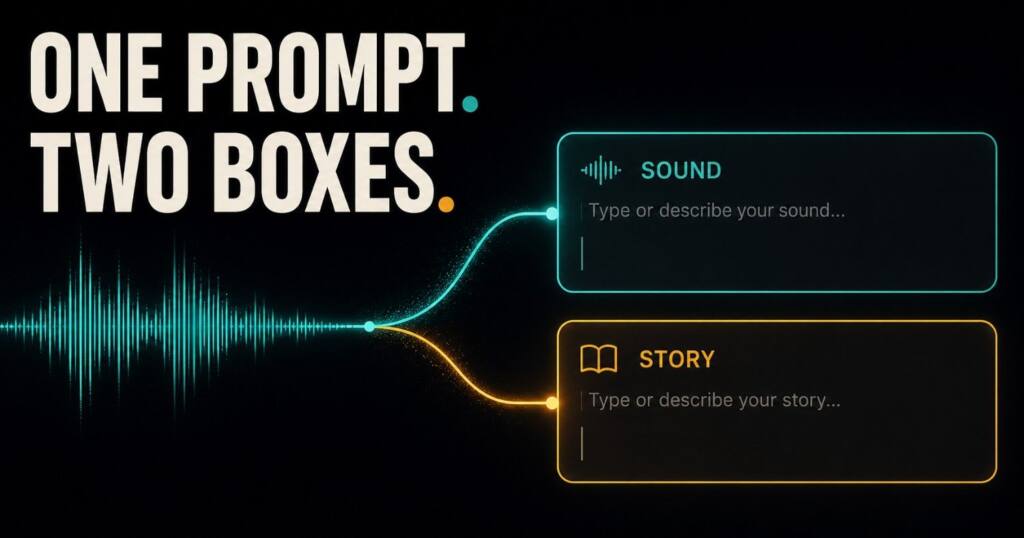
Here is the part those guides skip. Suno does not read your prompt as one block of text; it reads a style box and a lyrics box as two separate instruments, and on top of that it weights a field most people leave completely empty. Fix that one thing and your hit rate climbs before you ever touch a longer word list.
I have generated a few hundred tracks across the free and paid tiers since v5 landed. The pattern is boring. It is also consistent. The people getting clean results are not writing fancier prompts, they are writing clearer ones in the right box with one signal the rest of us keep forgetting.
This is the version of the guide I wish existed when I started. It covers what changed with v5.5, the prompt structure that survives model updates, a copy-paste library by genre, the artist trick that keeps you copyright-safe, and a troubleshooting table that maps the exact symptom to the exact fix. No padding. Just the parts that move your output.
What actually changed in 2026 (and why old guides mislead you)
Most Suno prompt articles still sitting in Google’s top ten were written for v3.5 or v4. They tell you to cram keywords because the old models needed that crutch. The current model does not work that way at all.
Suno released v5.5 on March 26, 2026. It is the stable model now, and Suno calls it its most expressive and most personal version yet. Three features shipped alongside it: Voices, Custom Models, and My Taste.
There is a catch that quietly changes how you should prompt. The free plan does not run v5.5. Free accounts run v4.5-all, the model from October 2025, with 50 credits a day that Suno estimates at roughly ten songs, while the newer model sits behind the Pro and Premier tiers.
Why does this matter? Because a guide promising that “v5.5 understands conversational prompts” is describing a model half its readers literally cannot reach. If your output feels stiff and your prompt looks perfect, check which model you are actually on before you rewrite a single word.
The three new features quietly rewrite the rules of prompting itself:
- My Taste learns your go-to genres and moods, then applies them through the Magic Wand. The payoff compounds. Over a few weeks your prompts can get shorter, because the model already leans in your direction before you type a word.
- Custom Models let Pro and Premier users upload at least six of their own tracks and train a private version of v5.5 on that exact sound. The prompt stops carrying the full weight of style.
- Voices lets you sing on your own AI songs after a quick verification step. Now your prompt has to leave room for a real vocal identity instead of inventing a fake one from scratch.
Suno also kept the model picker. You can pin v4.5 or v5 to reproduce a sound you liked from an older track. Newer is not automatically better for every genre, and that single setting saves more frustration than any prompt tweak.
The two-box rule
Open Suno’s custom mode and you see two fields: the style box and the lyrics box. Treating them as one bucket is the error sitting underneath most “random” results, and it is so common that fixing it alone will change your week.
The style box is short, around 200 characters, and it is the wrong place for your song’s story. Put genre, mood, instruments, vocal type, and tempo feel here. Nothing else belongs.
The lyrics box holds your actual words plus structure tags like [Verse] and [Chorus]. This is where you control the shape of the song, not its sound. When people dump “a song about my hometown with electric guitar at 120 bpm” into the style box, they are cramming a lyrics-box job into a sound-box field, and Suno splits the difference badly every single time.
One rule fixes it. Sound goes in the style box. Story and structure go in the lyrics box. Keep them apart and the model stops guessing which one you meant.
Here is what that split looks like for a single song, so the rule stops being abstract.
Style box:
melancholic indie folk, slow and reflective, fingerpicked acoustic guitar and soft strings, close male vocal, emotional film song
Lyrics box:
[Intro]
(soft guitar, fading in)

[Verse]
Empty platform, six a.m. light
Your train left before I could say goodnight

[Pre-Chorus]
And the cold settles in slow

[Chorus]
(strings swell, fuller arrangement)
So I'm learning how to let the quiet stay
Learning how to live the long way

[Bridge]
(strings drop out, guitar only)

[Outro]
(guitar fades to silence)
The sound lives entirely in the top box. The shape, the words, and the dynamic moves live in the bottom one. That separation is the whole game.
GMIV plus the signal everyone forgets
The 2026 community settled on a four-part formula for the style box: Genre, Mood, Instruments, Vocals. It works. Every reliable prompt I write hits those four.
But four is not the whole picture, and the gap is exactly why “good” prompts still drift on you. The missing signal is Purpose. What is this track actually for?
A background bed for a thirty-second reel behaves nothing like a release single, and a quick demo to test a hook behaves nothing like a finished master that you intend to sell. Name the job, and Suno stops optimizing for the wrong target.
So my working formula is GMIV plus P: genre and era, mood, key instruments, vocal style, purpose.
Watch the difference it makes. “Lo-fi hip hop, mellow, jazz piano, no vocals” is fine as far as it goes. “Lo-fi hip hop, mellow, jazz piano, no vocals, steady loop for a study video, no big dynamic changes” is the one that actually loops cleanly and does not spike in volume halfway through and blow out someone’s headphones.
Purpose is the cheapest upgrade in Suno. Four words. It removes the guesswork that quietly burns your credits.
Anchor first, then narrow
Here is the loop I run for every track. It is the opposite of how most people prompt, which is to throw every idea in at once and pray.
Step one: anchor. Pick one genre and one era. Just one. “2000s garage rock” beats “rock,” and it crushes “rock with some punk and a bit of indie and maybe shoegaze,” because a mixed anchor is the single biggest cause of mush in the entire tool.
Step two: add three to five descriptors. Mood, lead instrument, vocal type, production feel. Stop. The sweet spot really is four to seven total descriptors, and past that the model starts silently dropping the things it cannot reconcile.
Step three: generate twice, then compare. Never judge a prompt on one output. Suno is probabilistic, which means two pulls from the identical prompt can differ enough that you would reject the prompt on the first take and love it on the second.
Step four: change one variable. If the vocal is wrong, change only the vocal line and regenerate. Change five things at once and you learn nothing about which one actually mattered.
That loop is unglamorous. It is also the entire difference between people who think Suno is broken and people who quietly ship finished tracks.
A prompt library you can paste right now
These are written in the GMIV plus Purpose shape and worded for the current models. Drop one in the style box, then write your own lyrics underneath in the lyrics box. Modify everything freely, because a prompt you adjust always beats a prompt you copy.
Pop
2020s synth-pop, bright and hopeful, analog pads and crisp drum machine, airy female vocal, radio-ready singleAcoustic pop, intimate and warm, fingerpicked guitar, close male vocal, coffee-shop ad bedDark electropop, moody, vocoder textures and deep sub, breathy vocal, late-night reel music
Hip hop
Boom bap, head-nod confident, dusty jazz piano sample and crisp snare, laid-back male flow, beat tape openerTrap, cold and spacious, sliding 808s and tight hi-hats, auto-tuned hook, short-form hook testLo-fi hip hop, calm, vinyl crackle and soft Rhodes, instrumental, loopable study bed
Rock
1970s arena rock, big and triumphant, overdriven guitars and live drums, raspy male vocal, festival closer90s grunge, raw and restless, fuzzed guitars and loose drums, weary male vocal, demo for a band ideaIndie surf rock, sunny and carefree, reverb guitars and bouncy bass, group vocal, summer vlog music
Electronic
Melodic deep house, emotional and hypnotic, warm bassline and organic percussion, wordless vocal chops, sunset DJ setSynthwave, nostalgic and driving, analog arpeggios and gated drums, instrumental, retro game trailerDrum and bass, fast and bright, rolling sub and chopped breaks, liquid vocal, workout playlist
Cinematic and ambient
Orchestral cinematic, rising and heroic, full strings and brass with deep percussion, no vocals, trailer climaxDark ambient, eerie and slow, drifting pads and low drones, instrumental, horror scene bedNeoclassical, tender and reflective, solo piano with light strings, instrumental, emotional montage
Regional and non-English (underserved and worth it)
Suno handles many languages and regional styles far better than its English-only guides admit. Want Hindi, Punjabi, or fusion? Say so plainly, and name the instruments you expect to hear.
Indie Hindi pop, longing and gentle, acoustic guitar and soft tabla, emotive male vocal, indie film songPunjabi dance fusion, festive and energetic, dhol and modern synth bass, confident vocal, wedding reelCarnatic fusion, meditative and intricate, veena and subtle electronic pads, wordless vocal, focus playlist
I get far more usable regional tracks by naming one traditional instrument and one modern one. The contrast does the work. It hands Suno a clear lane instead of leaving it to guess at a vague “world music” blur that satisfies nobody.
How to sound like an artist without naming one
You cannot type “make it sound like Drake” or “in the style of Coldplay.” Suno blocks direct artist names for copyright reasons, and honestly it should. But you can describe the fingerprint that makes an artist recognizable, and that approach works better anyway, because a description is more specific than a name and it cannot accidentally summon a lawsuit.
The trick is translation. Turn the artist into traits: era, vocal character, instrumentation, and mood. Here is a short table you can extend on your own.
| Instead of naming | Describe this |
|---|---|
| A moody minimal pop star | dark pop, sparse beat, breathy close vocal, whispered intimacy, lots of space |
| A stadium piano-rock legend | theatrical 70s rock, layered harmonies, dramatic piano, operatic male vocal |
| A folk-pop acoustic singer | folk-pop, looped acoustic guitar, warm mellow male vocal, heartfelt and plain |
| A funk-pop showman | funk-pop, groovy brass stabs, danceable rhythm, slick confident male vocal |
| A dreamy bedroom artist | bedroom pop, hazy reverb vocal, lo-fi warmth, nostalgic and soft |
Notice what these have in common. None of them needs a name. The description carries the sound, and as a bonus you can blend two fingerprints to make something that is actually yours rather than a copy.
Metatags are real, but they are not magic
Tags like [Verse], [Chorus], and [Bridge] go in the lyrics box and shape your song’s structure. The core five are worth memorizing: [Intro], [Verse], [Chorus], [Bridge], [Outro]. Add [Pre-Chorus] for a build and [Instrumental] for a solo.
Now the honest part that most lists bury at the bottom or skip entirely. Tags are hit and miss. Suno follows them most of the time and flat out ignores them some of the time, and no amount of clever formatting will guarantee obedience from a probabilistic model.
Two things raise your odds, though. Keep each tag to one or two words, since a long tag confuses the parser and gets dropped. And when you need a specific feel, pair the tag with a short cue, like [Chorus] followed by a line such as “(full band, big and loud)” sitting on its own.
When a tag gets ignored on a take you otherwise like, do not restart. That is what Studio is for, which brings us to the workflow shift.
Vocal cues and dynamics, in plain words
Beyond structure tags, you can steer how the voice is delivered. These cues go in the lyrics box, usually right beside a section tag, and they shift the emotional weight of a line more than any adjective in the style box can.
The ones that earn their place most often:
- Delivery: whispered, belted, raspy, breathy, falsetto, spoken word
- Style: rapping, operatic, scatting, harmonized
- Dynamics: soft-spoken, shouted, building intensity, fading out
A line like [Chorus: belted, powerful] lands harder than a bare [Chorus] when the song is reaching for a peak. Like all tags, these are hit and miss. Try two takes before you decide a cue does not work.
Tempo and energy without the numbers
Old guides tell you to write “120 bpm, 4/4.” The current model reads feel better than it reads math, so describe the energy and let the number ride along behind it.
“Driving and urgent” moves a track more reliably than “128 bpm” sitting there alone. “Slow and spacious” shapes a ballad better than “70 bpm” on its own. Pair them when you can, because a number plus a feel word gives the model both a target and a vibe to aim at.
For anything meant to loop, say it out loud in the prompt. “Steady energy, no big drops” keeps a background bed from lurching, and that lurch is the single most common complaint about Suno tracks used under video.
Where prompting stops and finishing starts
This is the 2026 reality that older guides simply cannot tell you, because the tools did not exist when they were written. Suno is no longer just a prompt box. Studio 1.2 turned it into a small production suite that sits right next to the generator.
A prompt is the direction layer, and that is all it is. It gives you strong raw material to work from. After that, the smart move is to repair the good take you already have instead of burning ten more generations chasing a perfect one that may never come.
Studio 1.2 added the tools that make this practical. Remove FX cleans up a muddy result. Warp Markers fix loose timing, Alternates let you audition variations without losing your session, and Time Signature support finally handles odd meters.
So the rule of thumb is simple. Rewrite the prompt when the style lane, the mood, or the genre center is wrong. Reach for Studio when the idea is right but the timing, the effects, or the arrangement needs a human pass. Knowing which lever to pull is most of the skill.
Negative prompting: tell it what to leave out
One of the most reliable ways to rescue a drifting track is to name what you do not want. Suno responds to exclusions, and they tend to cut faster than piling on more positive words ever will.
The everyday ones earn their keep. “Instrumental only” or “no vocals” stops a phantom singer from wandering in. “No autotune” rescues a vocal that keeps turning robotic on you, and “avoid bright major-key feel” drags a track that insists on sounding cheerful back toward the mood you actually asked for.
Position matters. Put your exclusions near the front of the style box when the model keeps overriding them, because a buried instruction is an ignored one.
Troubleshooting: symptom, cause, fix
This is the table I actually use. When a track fails, I do not rewrite the whole thing from scratch like a panicking beginner. I diagnose it, row by row, and fix the one thing that broke.
| Symptom | Likely cause | The fix |
|---|---|---|
| Genre keeps changing between takes | No genre anchor, or two competing genres | Pick one genre and one era, drop the rest |
| Output sounds generic and thin | Too few descriptors, or all vague | Add a specific lead instrument and a production feel |
| Vocals appear when you wanted none | Missing exclusion | Add “instrumental only” near the front |
| Song ignores your structure | Story and tempo dumped in the style box | Move structure to the lyrics box with tags |
| Vocal keeps going robotic | Default autotune behavior | Add “no autotune, natural vocal” |
| Every song starts the same way | Suno defaulting to a stock intro | Specify it: [Intro] plus “(solo piano, 8 bars)” |
| Track spikes in volume mid-song | No purpose signal for steady use | Add “steady loop, minimal dynamic changes” |
| Conflicting, muddy result | Contradictory descriptors | Remove opposing terms like “calm aggressive” |
| Great idea, loose timing | Production issue, not a prompt issue | Fix in Studio with Warp Markers, do not regenerate |
Most “Suno is random” complaints are one row in this table. The tool is doing exactly what the prompt told it, which is the uncomfortable and useful truth.
Frequently asked questions
What is the best format for a Suno prompt? Split it. The style box is for sound, the lyrics box is for words. In the style box, write genre and era, mood, key instruments, vocal style, and purpose, all under roughly 200 characters, and let the lyrics box carry the structure.
How many descriptors should I use? Four to seven. Fewer gives you generic output. More gives you conflict, because the model quietly drops what it cannot reconcile, so a tight list beats a long one every single time.
Why does Suno ignore my vocal instructions? Position. Vocal cues get deprioritized when they sit at the end of the box, so move them to the front and reinforce with an exclusion like “female vocal only, no male voices.”
Can I use artist names? No. Suno blocks them for copyright reasons. Describe the artist’s traits instead, which means era, vocal character, instrumentation, and mood, and the description ends up more specific than the name would have been.
Does the free plan use v5.5? It does not. Free accounts run v4.5-all from October 2025, while the current v5.5 model sits behind Pro and Premier. If your results feel dated, confirm your model before you blame your prompt.
How many times should I regenerate before changing the prompt? If three takes miss completely, rewrite. If you are close, run five or six variations of the same prompt before touching a word, because finding the right take often takes several pulls and the prompt may already be fine.
Can I sell music I make with Suno? Maybe. Your commercial rights depend on your Suno plan, not on any prompt tool, and paid tiers generally grant ownership while free does not. Check Suno’s current terms before you release or monetize anything.
Do tags work in every language? Mostly, yes. Structure tags work across languages, and Suno handles many non-English styles well, so name a traditional instrument and a modern one to give regional tracks a clear lane.

Ved Vyas
Writer at Fable Knows, covering AI and the technology shaping everyday life.
Related stories.

X Live Studio Is Here. $1 Million Free Money or Another Articles Contest?
X Live Studio launched July 1 with scheduling, chat gating, and a $1M creator pool. Check who gets access, the payout catch, and how…
Claude Science: 7 Powerful Changes for Researchers in 2026
Claude Science launched June 30, 2026 as Anthropic’s AI workbench for scientists. See what the beta does, who it’s for, and why reproducibility is…
[…] Read Article about Suno Ai here […]
[…] Suno defaults to the most common interpretation of any vague input. Type “rock song” and it builds around the statistical center of every rock song in its training data. That center is not bad. It is just plain average. And average, predictable and forgettable, is exactly what every beginner prompt quietly produces over and over again. […]
[…] top Premier tier opens Suno Studio, a full multitrack workspace that behaves like a digital audio workstation. You can edit on […]
[…] Suno v5.5 support classical tempo names like Andante or Presto?Yes. They function the same way a BPM […]